November 1, 2026 · Pre-release preview
Grave Seasons Gameplay Preview: Controller Farming and Crowbar Exploration
Prepare for Grave Seasons with a closer look at controller farming, the crowbar, isometric exploration, and the confirmed March 9, 2027 release plan.
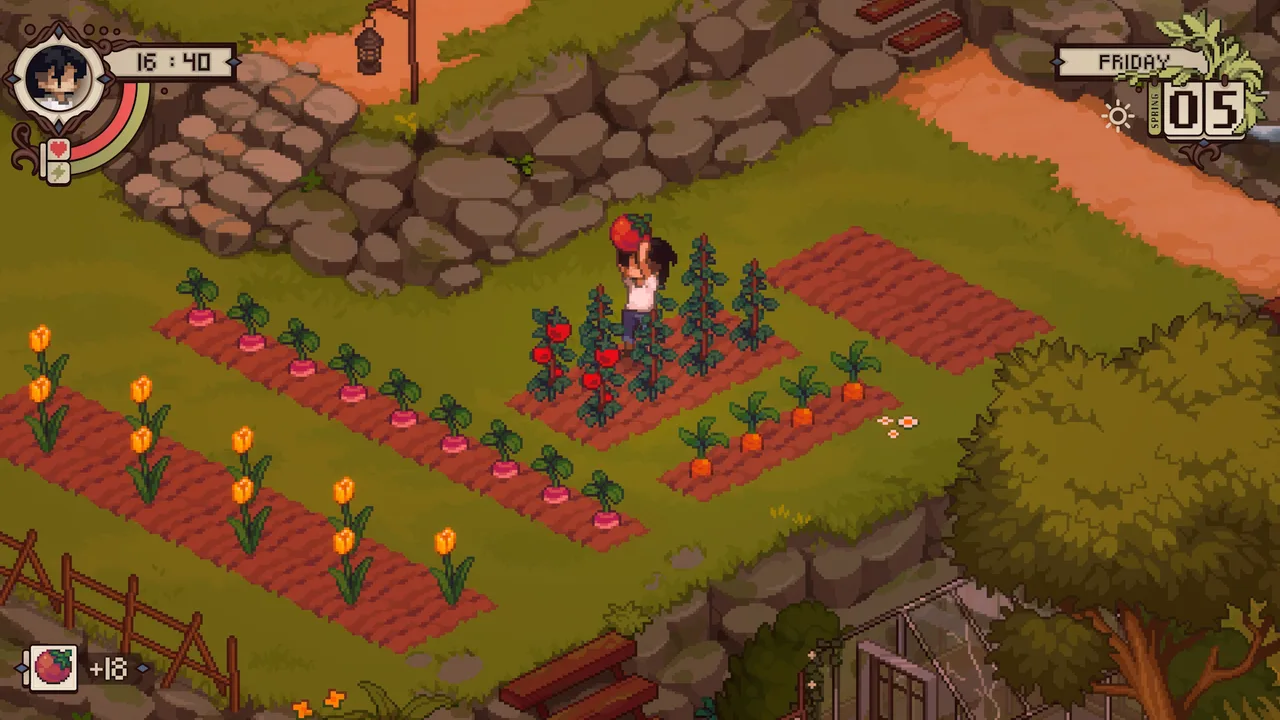
Grave Seasons is still ahead of release, with March 9, 2027 now listed as its planned launch date. That gives prospective farmers time to understand a more interesting question than which crop will supposedly make the most money: how does a farming mystery make everyday movement, tools, and investigation work together? The latest developer explanation highlights controller adjustments, an isometric grid, and a crowbar that replaced an earlier pickpocketing idea. These details offer a useful gameplay preview without pretending that a finished walkthrough already exists.
Start with the controls the team has actually described
The developer has discussed a radial menu intended to improve access on controllers, alongside a button players can hold to rotate while working on farming plots. Those are concrete interface changes, but they are not a complete published control map. Avoid memorizing an invented button combination before you have the game. Instead, plan your first session around learning how the released interface distinguishes moving your character, facing a plot, selecting a tool, and confirming an action.
For a controller user, a useful opening exercise will be to face one plot, change direction without traveling away, and check which tile the game highlights. Treat this as a suggested launch-day test rather than a description of a playable build. If the tutorial offers a different method, follow it. The goal is to understand targeting before creating a large farm whose edges or corners make mistakes harder to notice. One accurately selected tile teaches more than a rushed field of uncertain inputs.
Why the isometric view changes farm planning
An isometric scene can make a rectangular grid look diagonal on screen. That creates a small but meaningful learning problem: a direction that feels visually natural may not select the neighboring tile you intended. The developer's discussion of farming prototypes makes clear that implementing a readable grid took work. When the game launches, look for the actual plot outline or selection feedback rather than relying solely on where your character's sprite appears to be standing.
Keep your first layout legible. Leave enough visible access to inspect the edges of a small test area before committing to decorative or densely packed arrangements. This is a planning recommendation, not a claim about collision rules, path widths, or planting restrictions. No verified crop price or growth table is required to learn targeting. A simple plot lets you compare the action you intended with the action the interface recorded, which is the foundation for any later efficient farming routine.
Read prototype footage as development history
The developer has shown examples from earlier farming iterations, including wet plots and an old infinite-harvesting bug. Those examples explain how the systems evolved; they are not instructions for an exploit in the release version. If an old clip appears to show unlimited produce, do not build your launch plan around reproducing it. The same caution applies to temporary art, unfinished animations, and interface elements that may have changed between prototypes and the content-complete build.
A reliable preview separates three things: a feature the team says remains in the game, a problem shown from an old prototype, and a player's proposed experiment after launch. That distinction prevents a surprisingly common mistake in pre-release guides, where an amusing developer anecdote becomes a supposed current mechanic. Use the footage to understand the design challenge. Wait for the final tutorial and tool descriptions before turning it into advice about a profitable loop or an action that is safe to repeat.
The crowbar gives exploration a different focus
One of the most distinctive disclosed changes is the move away from pickpocketing toward breaking and entering with a crowbar. The developer explains that approaching a moving resident from the correct angle did not produce a satisfying pickpocketing interaction in the isometric view. Shifting important objects into homes and other spaces instead gives exploration a clearer physical focus. For a mystery, that changes the kind of attention a player brings to town: buildings and access points become worth noticing alongside the people outside them.
This does not establish that every locked door can be forced, that entering is always consequence-free, or that the crowbar provides access to every clue. Those are release questions. A sensible preparation habit is to record the location, visible access condition, and current objective when you encounter a blocked space. Once the game teaches the actual tool interaction, compare it with that note. You will then know whether the obstacle is part of the intended investigation or simply a location that is not yet available.
Explore homes without writing a killer solution in advance
Because the design places importance on interiors, a future investigation notebook should distinguish what you saw from what you assumed. A room containing an unusual object is an observation. A resident owning that object may be a clue. Declaring the resident guilty is a separate conclusion that requires the game's evidence. That separation is particularly useful in a farming mystery, where familiar places and ordinary routines can acquire different meanings as the story progresses.
Prepare a compact note format with the displayed location name, the day or scene, the active objective, and the interaction result. Leave the culprit field blank. This gives you a practical way to preserve discoveries without letting an attractive theory rewrite your memory. Do not copy an alleged victim order or final accusation from a pre-release post unless the developer has intentionally disclosed it and you want that spoiler. A preview can explain how to observe spaces without publishing an imaginary solution.
Balance an errand route with curiosity
The town of Ashenridge is more than a backdrop for farming. The developer describes the paths from the mountaintop farm into town and onward toward other areas as frequently used routes during development. That suggests a useful way to approach your first playable sessions: learn the main connections before chasing every side path. It does not justify drawing a final map from a screenshot or claiming a precise travel time between two buildings.
When a released objective sends you into town, choose that objective as the anchor for your outing. Notice nearby doors and residents, but keep a record of the primary task so that a tempting detour does not erase the reason you left the farm. Later, verified movement times and opening conditions may support an optimized route. Before release, the best preparation is a readable map notebook and a willingness to revise it as the game reveals new connections and restrictions.
What content complete means for your expectations
The team describes the game as content complete and clarifies that new quests, items, and dialogue have stopped being added while polishing, bug fixing, and port work continue. This is a production milestone, not a promise that the game is already available or free of defects. The release move to March also gives context to the controller work: interface improvements and platform testing are part of preparing the existing game for players across its planned versions.
If you are choosing between PC and a console, wait for the purchase page and the final platform-specific details relevant to you. Do not assume that owning a copy on one system provides another copy, transfers saves, or guarantees identical performance. None of those benefits follows simply from parallel development. Keep the release date and your preferred control method on a short checklist, then review the actual listing before buying. The extra wait does not require committing to unannounced features.
A useful launch-day learning order
Begin with the tutorial, identify the active tool, learn how the selected tile is shown, and practice facing a plot without unnecessary movement. Next, make one small farming action and verify the result in the interface. Then follow the opening town objective, record one route, and inspect a relevant building when the game introduces the exploration tools. This order is an optional learning plan, not a claimed walkthrough sequence or a guarantee that every system unlocks immediately.
Leave optimization until you have reliable observations. Crop values, growth times, resident schedules, entry consequences, and the mystery's evidence rules all deserve verification in the released game. The confirmed crowbar and controller changes already show why Grave Seasons is worth watching: its daily farming and darker investigation depend on readable interactions in the same isometric world. Understanding those interactions will give you a stronger first session than memorizing a speculative profit chart or someone else's untested killer theory.
Explore the Grave Seasons guide library, release status, and farming and investigation preview.